All Project functions in short
A Project is like a desktop. When you are busy with many windows, containing
different view, it is not pleasant to build all this up again next time when you start up the application. When you
are working in a project, all these setting are stored in a project file, as soon as you close the project.
At most one Project can be open at the same time. When you close the application, an open project will close.
When you close a window, you need to decide to save unsaved changes or not,
because the wave or music will be no part of the project anymore and its unsaved data is not stored in the project anymore.
You can always create a project. If there is already an open Project, it will be closed first before another Project is opened.
When creating a Project, you need to give the name and location for the new Project file.
You can always open a project. If there is already an open Project, it will be closed first before another Project is opened.
When opening a Project failed, no Windows are left open, to avoid further damage.
An open Project can be closed at each moment. When you close the application or close Windows, an open project is closed automatically.
An open project can be saved at each moment. The reason for this function is saving unsaved changes, before any possible crash of the application or computer.
Normally an open project is saved when the application is closed correctly, but it does not if the application is stopped by another way.
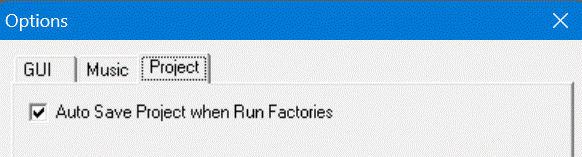
Automatically save a Project when run Factories
You can specify whether or not save a Project automatically before run one or more Factories. You can do this in the Options of the WaveThunder, you found the right settings under tab "Project":
When you are busy in a project and you
need to continue on another computer, it is very useful to export the project.
Normally only unsaved data is stored into the project, but when "normal"
files goes out of reach, it is necessary to save these data too. This is
done by this function. When exporting a project, you had to give the name and location for the new Project file. After this, you only need
to copy the Project file and the correspondenting Project directory.
There are some Main Run settings that belong to a Project:
- Whether the Project has a Main Run
and when it has:
- The Name of the Factory
- How the Factory is runned
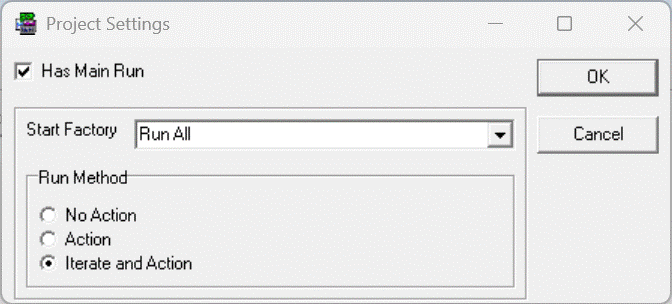
In this examople, the Project has a Main Run. Factory "Run All" is started as an Iteration Factory.
This Action is enabled when a Main Run is defined for this project.
When using no Projects, you are editing waves, music, music players, factories and tables at its own. For each
window (or a tab of the Factories Window) you close, you had to decide to save unsaved changed or not. When you exit the application, open or create a project, all windows will close and data need (or not) to be saved.
Note that for each wave window, the corresponding shadow file with view properties are still used, so view properties of every window are still saved.
Last updated: 8-12-2025