Music Players
Music Players
A Set of Music Players are saved into a .wty file. Each Set of Players has a own MDI Window which is also a Dialogbox.
As Music Unit, Factories and Waves, you can Save, Load, Revert and Duplicate Sets of Players, and register it under a unique name.
Each Player in a Set of Players has a name, so it is possible to refer to Players from a Music Unit.You can create, edit and delete Players.
Each Player has Name for referencing it from Note Groups. You can edit the Name, but it must be unique in the Set of Players.
Player Parts
You can specify how loud the Player will play, and you can increase or decrease the frequency of the player in comparison with the normal frequencies which the player should play; the deviation of the frequencies. You can change the Volume and Balance of the sound, and the time offset.
There are 8 kinds of Players:
1. Factory Player
2. Simple One Sampler
3. Roll Out Sampler
To get the right length of the result, the whole wave or a part is rolled out. If the wave has no selected part, the whole wave is rolled out. If it has a selected part, then the result is the concatenation of the following three parts:
- The part before the selected
- The selected which is rolled out 0 or more times
- The part after the selected part (outro)
4. Roll Out Wave Form
The right frequency is accomplished by using the right roll out speed.
The right length is accomplished by using the right roll out count.
5. Repeat Wave Form
The right frequency is accomplished by using the correct difference time.
The correct length is accomplished by using the correct repeat count.
6. Resonant sampler
- The part before the selected part (intro)
- The selected which is rolled out 0 or more times
- The part after the selected part (outtro)
7. Midi player
8. Reference player
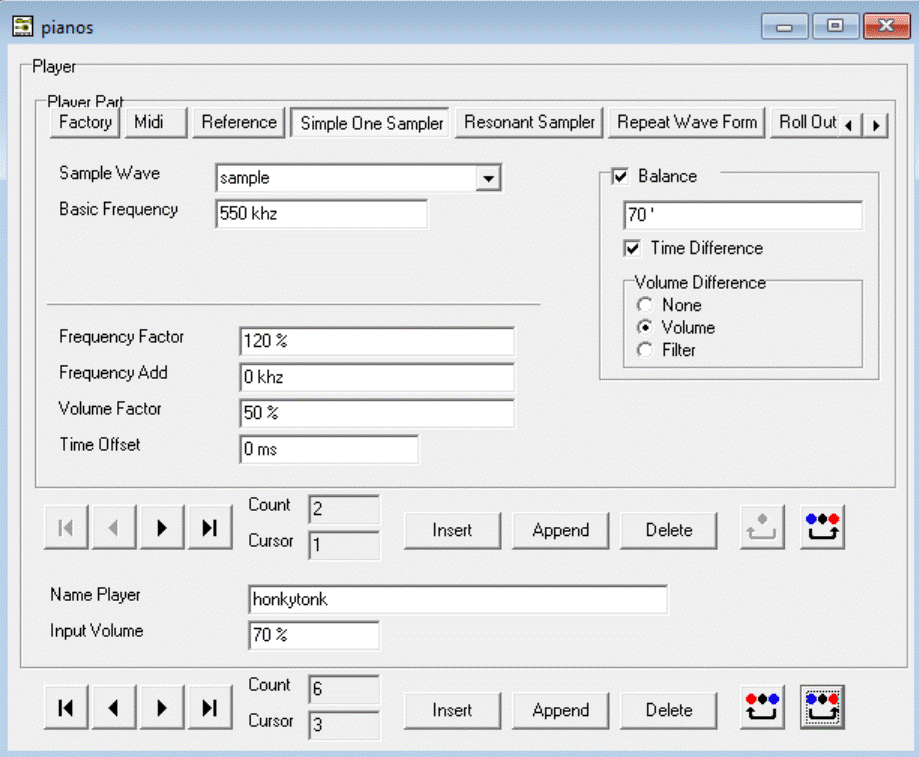
In the Player Set "pianos" Player "honkytonk" is selected. The Player consists of two Player Parts. The first Player Part is selected and is a type of "Simple One Sampler". The balance of that sound is placed 70 degrees to the right channel.