Maintaining Table Structure
Creating and Maintaining Columns
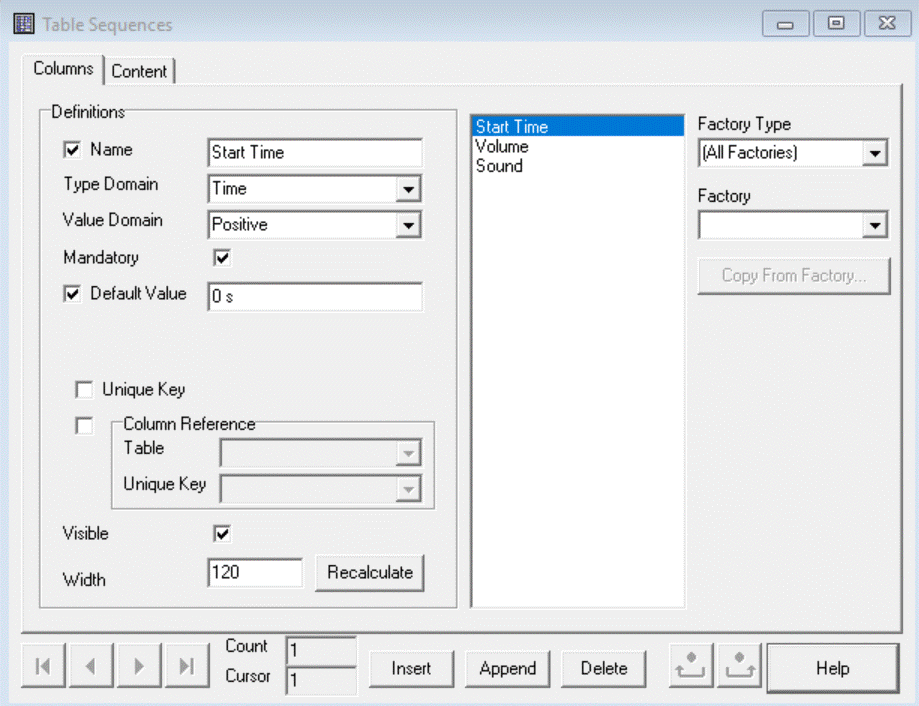
In tab "Colums" you can:
- Add (Insert or Append) a new Column
- Change the selected Column
- Delete the selected Column
- Browse through the Columns
- Move the selected Column forward or backward by the two buttons right of the Delete-button
Every Column have:
- a Name
- a Type Domain for example "Factor", "Time" or "Wave"
- a Value Domain for example "Positive"
- if the Value is Mandatory
- The Default Value when a new row is create the cell get this Default Value.
- if all Values in the Column are unique, Unique Key
- Optionally the reference to a Unique Key Column of another Table
- if the Column is Visible
- the Width of the Column (if visible)
Copy Factory Input and Outputs to Columns